Mail Log
Overview
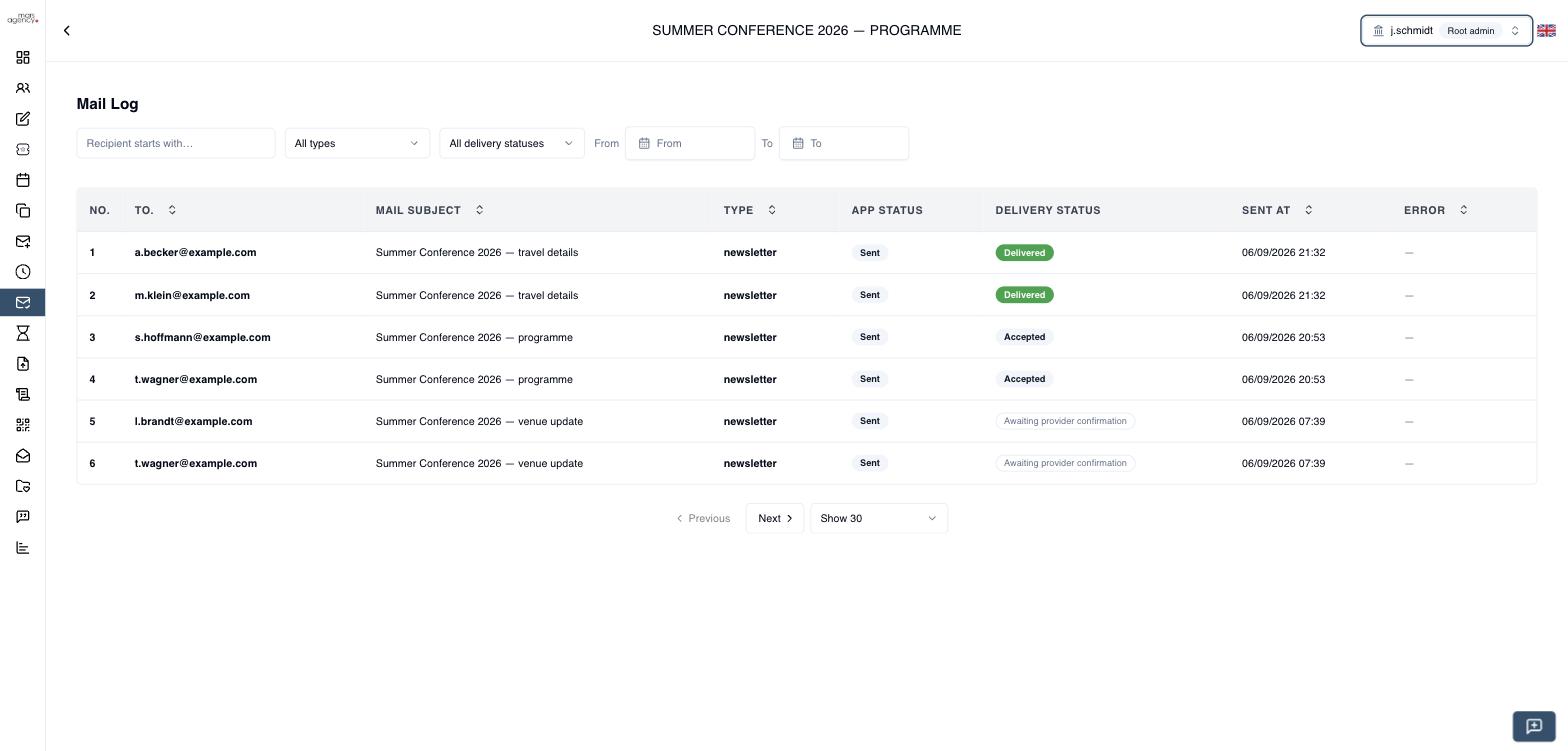
The Mail Log lists every email the tool sent for one event, one row per recipient, and shows what the receiving mail server did with it. It answers the question that used to require opening Mailtrap: did this person get the email, and if not, why not?
Requires the EVENT_SEND_NEWSLETTER permission — ADMIN and ORGANIZER roles have it.
This is different from the organization-wide Mail Logs page, which lists mail across the whole organization. This one is scoped to a single event and adds delivery status.
Opening the Mail Log
Open an event and choose Mail Log in the event sidebar.
What the list shows
| Column | Meaning |
|---|---|
| To | The recipient. |
| Mail subject | Subject as sent. |
| Type | Which kind of mail this was — see Mail types. |
| App status | Whether our system handed the mail off: Sent, Failed, Pending, Queued. |
| Delivery status | What the provider reported back — see Delivery status. |
| Sent at | When it was sent, in your own timezone. |
| Error | Populated when our side failed to send at all. |
Filtering
- Recipient starts with… — type the beginning of an address. Matching is case-insensitive.
- All types — narrow to one kind of mail.
- All delivery statuses — e.g. show only what bounced.
- From / To — a date range. Both bounds are inclusive and use your own timezone, so picking the same date in both returns that day's mail.
Delivery status
This is the important column, and the distinction between two of its values matters:
| Status | What it actually means |
|---|---|
| Awaiting provider confirmation | Mailtrap has not reported an outcome yet. Unknown — not "fine". |
| Queued | Queued for sending. Mailtrap has not received it yet. |
| Accepted | Mailtrap accepted the message. The recipient's mail server has not confirmed delivery. |
| Delivered | The recipient's mail server accepted the message. |
| Bounced | Permanently rejected by the recipient's server. It did not arrive. |
| Soft bounced | Temporarily rejected. The provider may still retry. |
| Spam | The recipient marked it as spam. |
| Rejected | Mailtrap refused to send it — commonly a suppressed address. |
| Dropped | Dropped before any delivery attempt. It was never transmitted. |
Accepted only means our sending provider took the message. Delivered means the recipient's mail server took it. A message can sit at Accepted and never arrive.
Do not tell a client an email arrived on the strength of Accepted. Only Delivered supports that claim, and only Bounced, Rejected or Dropped support the opposite one.
Statuses arrive on their own, pushed by Mailtrap as events happen — there is no refresh button and nothing to wait for. A row can stay at Accepted for a while before turning Delivered.
Mail detail
Click any row.
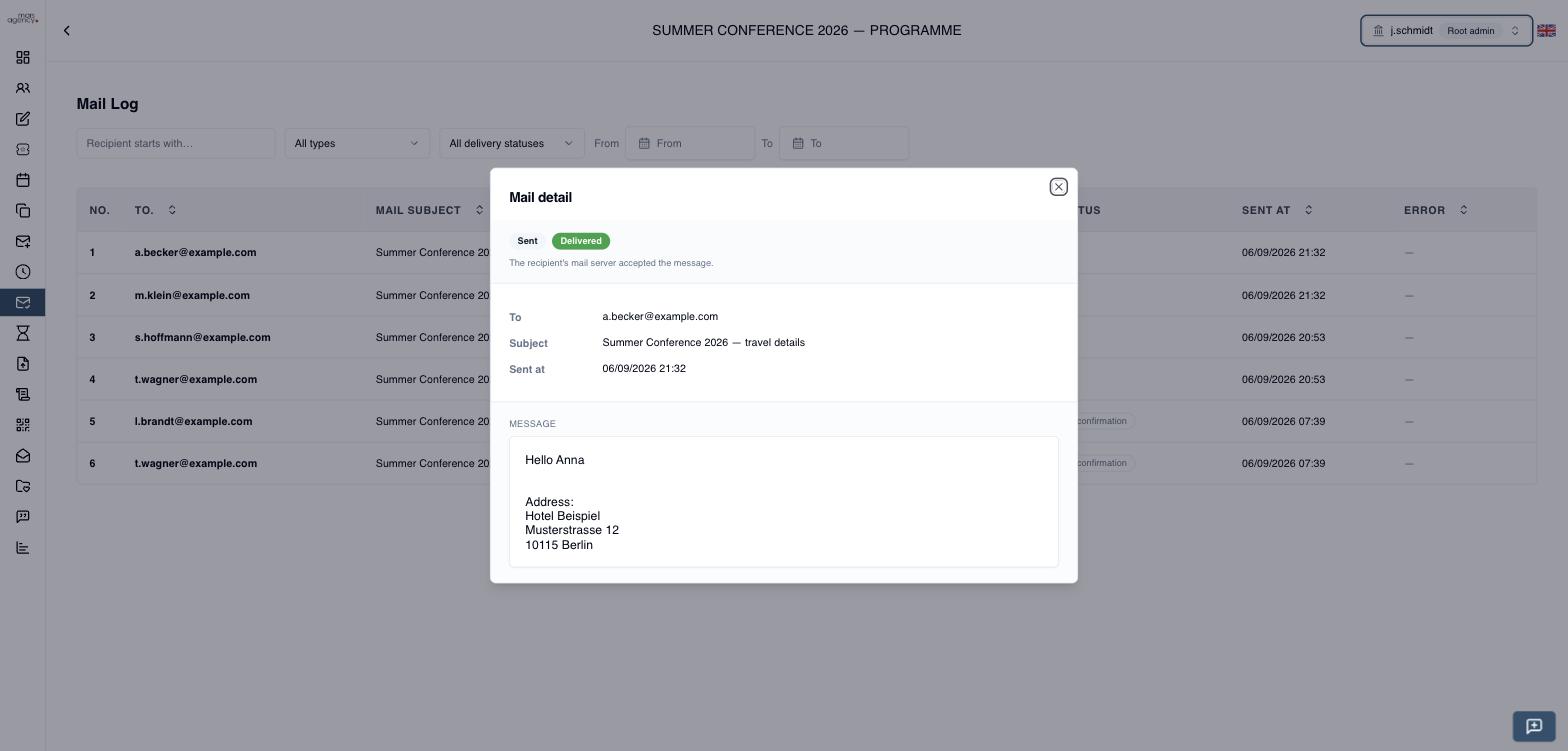
The top strip answers the delivery question first: both statuses, a sentence explaining what the provider status claims, and — when there is one — the bounce reason or send error in red.
Below that are the recipient, subject and send time, then the message body exactly as it was sent.
Message bodies are removed from older mail to control storage. When that has happened the detail view says "No message body stored for this mail." The row itself, including its delivery status, is kept.
Delivery report for one mailing
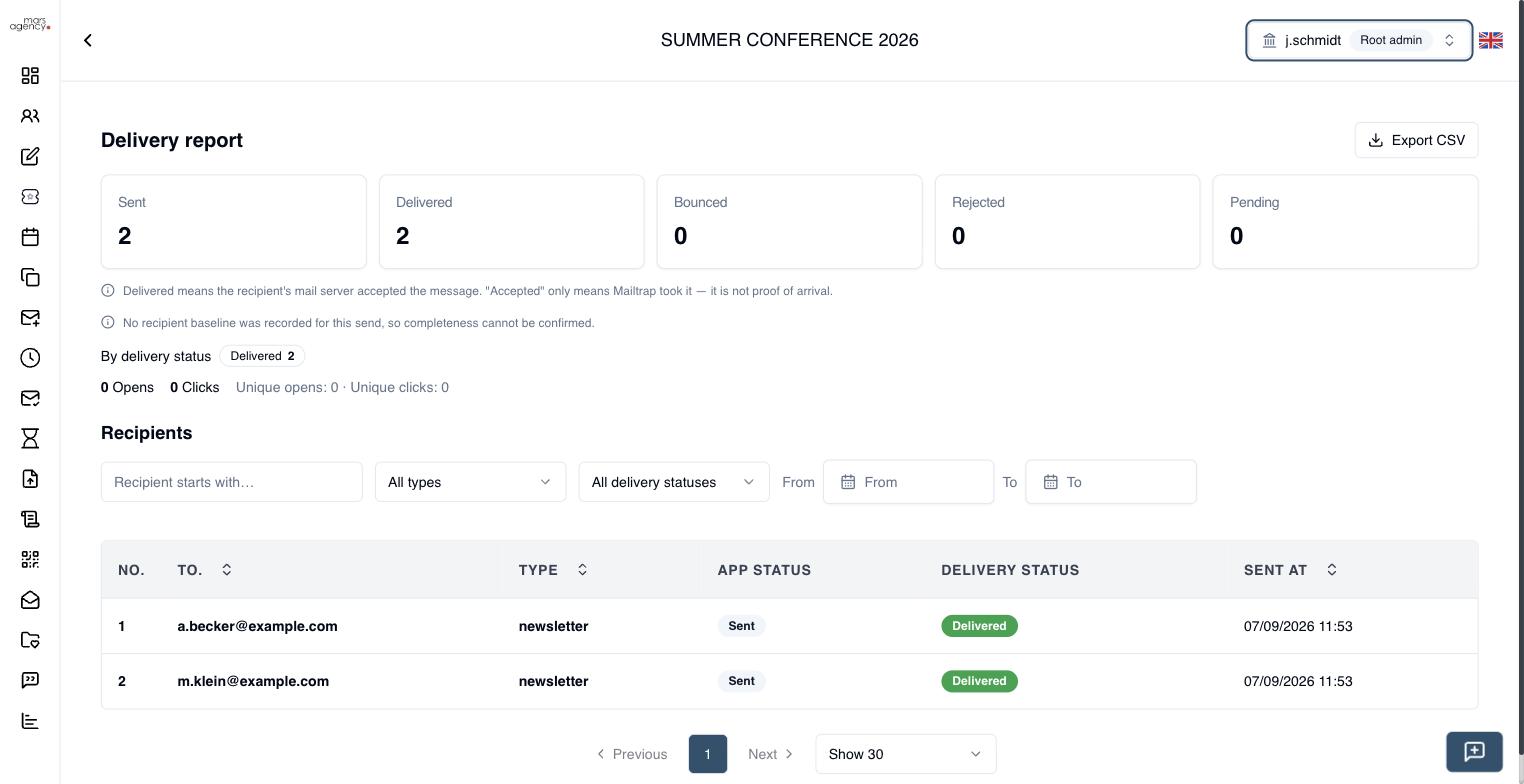
Every send produces a mailing — one email campaign, one row per recipient. The delivery report answers, for that mailing as a whole: how many went out, how many arrived, and how many did not.
Open a sent mailing from Email History to reach it.
The headline figures
| Figure | Meaning |
|---|---|
| Sent | Messages that left our side — one per recipient. |
| Delivered | The recipient's mail server accepted the message. |
| Bounced | Rejected by the recipient's server, permanently or temporarily. |
| Rejected | Refused before delivery — a suppressed address, spam complaint, or dropped message. |
| Pending | No provider outcome yet. Normal shortly after sending. |
Delivered is the number to quote. Pending includes messages Mailtrap has accepted but the recipient's server has not — accepting is not arriving.
If you are answering a client asking whether their attendees received an email, the answer is the Delivered count, never Sent and never Sent minus Bounced.
Below the figures are opens and clicks, both total and unique recipients.
Completeness
The report says when it cannot vouch for itself. If it shows
No recipient baseline was recorded for this send, so completeness cannot be confirmed.
then the mailing has no record of how many recipients it was supposed to reach, so the report can only describe the rows it found. It is not claiming those rows are the whole mailing. When a baseline does exist and rows are missing, the report says so explicitly rather than presenting a partial count as complete.
Recipients and CSV export
The list below the figures is the same per-recipient view as the the list on this page, filtered to this mailing, with the same search and filters. Export CSV downloads it — recipient, type, statuses and send time — so the account team can answer "it never arrived" from a spreadsheet without opening Mailtrap.
A mailing is grouped by an identifier stamped at send time. Emails sent before that existed have no mailing to belong to and will not appear here; they remain visible individually in the the list on this page.
Per-attendee history
From the attendee list you can open one person's mail history — every message that attendee was sent for this event, with the same delivery statuses. Useful when someone says "I never got it": you can answer for that individual rather than for the mailing as a whole.
Mail types
The type filter offers only the kinds of mail that belong to an event:
| Type | Sent when |
|---|---|
| Confirmation | Someone registers for the event. |
| Newsletter | An organizer sends an email or newsletter from Send Emails/Newsletter, including manually sent event invitations. |
| Reminder | A scheduled reminder fires before the event. |
| Date change | An organizer changes the event date and registered attendees are notified. |
Other mail the system sends — password resets, organization invitations, verification codes — is not tied to an event and appears on the organization-wide Mail Logs page instead.
E-card invitations sent from the admin interface are recorded as Newsletter, not as a separate invitation type. Filter by Newsletter when checking whether an invitation reached someone.
Troubleshooting
A recipient says they never received the email. Filter by their address. If the row says Delivered, their mail server accepted it — check their spam folder next. If it says Bounced or Rejected, open the row: the reason is shown in the status strip.
The delivery status is stuck on Accepted. The recipient's server has not confirmed yet. This is normal for a short period after sending. If it persists for more than a day, raise it — an unresolved row is flagged internally.
A row shows Rejected with a suppression reason. The address is on the sending provider's suppression list, usually because it previously bounced or the recipient unsubscribed. Nothing was transmitted, and re-sending will not help until the address is removed from that list.
No rows at all for an event. Only mail sent after this feature was enabled is linked to its event. Older mail is on the organization-wide Mail Logs page.